Query fan-out: how AI splits a search and how to check your content

AI summary
- Query fan-out means AI search such as Google's AI Mode, AI Overviews and ChatGPT splits one question into many sub-queries and looks for sources for each one.
- Your chance of being cited grows when your page answers those sub-queries in clearly structured sections with numbers and sources.
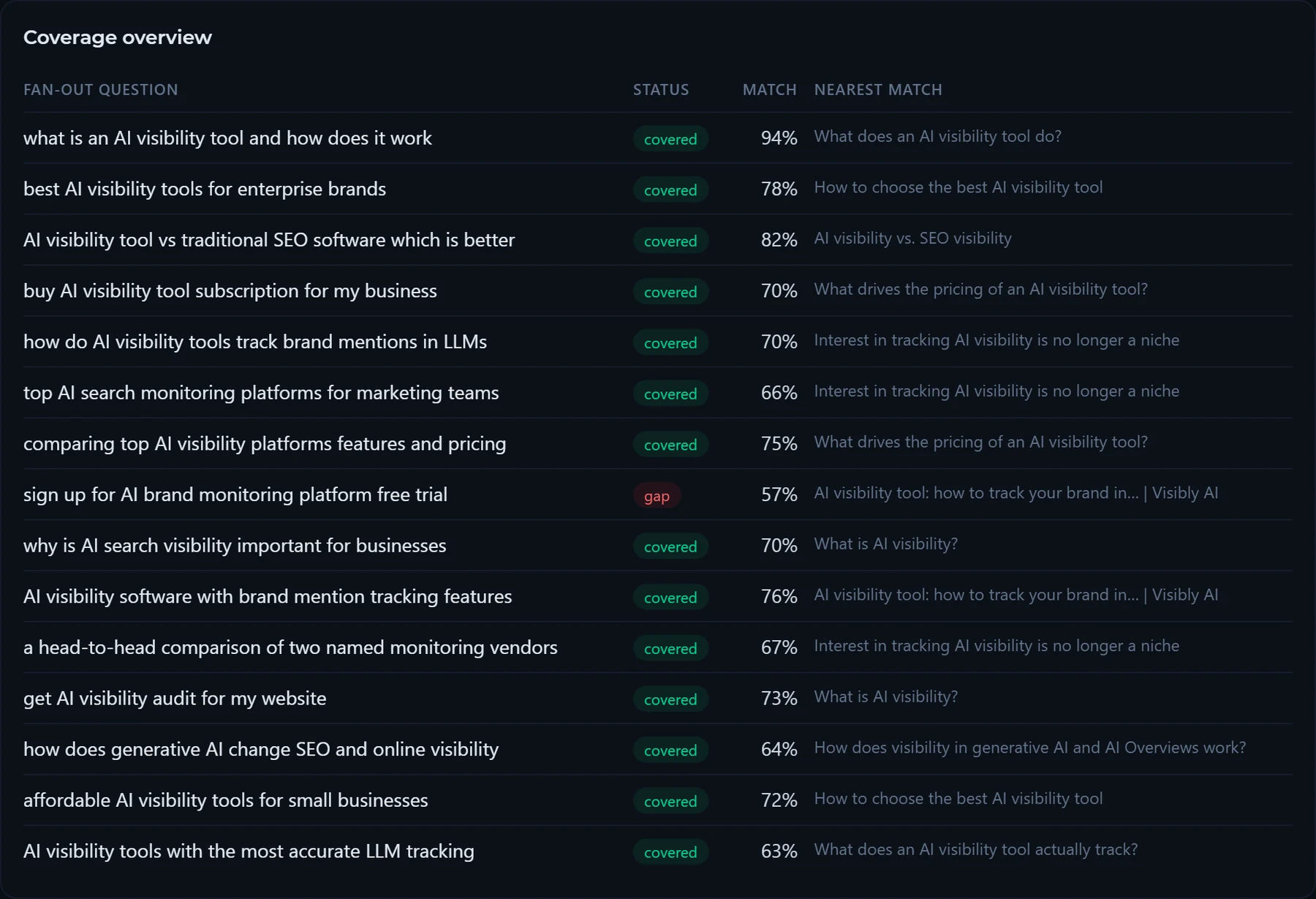
- Our own check on November 10, 2026: 14 of 15 sub-queries covered, score 93 percent, one gap on the free trial and two matches assigned to the wrong section.
- In both languages the purchase questions (trial, audit, buying) were covered worst, so that is where to add content first.
Created with AI, the details are in the article.
Table of contents
- What is query fan-out and how does it work?
- What does query fan-out mean for SEO and keyword research?
- Original research: what the check found on our AI visibility article
- How to check query fan-out in Visibly: find the missing content
- Case study: what I take from client projects
- Frequently asked questions about query fan-out
This morning I ran our own article on AI visibility tools through the query fan-out check in Visibly AI®. The result looked great: 14 of 15 fan-out queries covered, a coverage score of 93.3 percent. Reading the matches told a different story. The sub-query "how do AI visibility tools track brand mentions in LLMs" was matched to a table of search volumes. And the question about getting an AI visibility audit was matched to the definition section, which offers no audit at all.
That is what query fan-out is about. An AI search system like ChatGPT, Gemini or Google AI Mode splits every user question into fan-out queries and runs a separate search for each one. Whether your website shows up in the answer depends on whether your pages answer those sub-queries. In this article I explain how query fan-out works, what it means for SEO and keyword research, and how to check your own content: with a tool, and with a healthy distrust of the score.
What is query fan-out and how does it work?
Query fan-out (also written query fanout) describes how AI search systems built on artificial intelligence split one query into several related searches. These searches run in parallel, and the results are combined into one answer. Google describes it in its documentation for site owners: AI Overviews and AI Mode may use a "query fan-out" technique, issuing multiple related searches across subtopics and data sources to develop a response (Google Search Central, AI features and your website).
Put simply, query fan-out is the research step behind an AI answer in Google AI Mode, in AI Overviews and in ChatGPT search. In AI Mode the answer replaces the list of search results. In AI Overviews it sits above the organic results. In answer engine optimization (AEO) and SEO, the definition matters because it changes the unit you optimize for. You no longer win one search query. You win the sub-queries behind it, one passage at a time.
What does it mean when a single prompt generates multiple hidden searches?
In my workshops on generative search optimization I explain it with a vacation example. Someone asks for the best family vacation and gets a finished answer. In the background, the AI searched for child-friendly hotels, destinations on the Mediterranean, travel seasons and prices. A hotel with "family hotel" in its title that answers none of these sub-queries does not appear in the answer. You see this most clearly with hotel content and local businesses, because the sub-queries get very specific: distance to the beach, childcare, how to get there.
The user sees one prompt and one answer. The search engine ran many hidden searches in between. Each of those searches is a separate chance for your pages to be retrieved.
Why do LLMs generate multiple sub-queries from a single user prompt?
A single search rarely returns every fact a good answer needs. A large language model therefore works like a researcher. It breaks the task down, searches for each part and assembles the results into one text. An answer engine like Perplexity combines sources on price, comparison and experience into a single answer this way. For the AI, it is the fastest path to a complete answer. For you, every sub-query is a separate chance for visibility.
In answer generation, query fan-out plays the role of information retrieval. First the system collects passages for each sub-query, then the language model writes the answer from them. What the retrieval step misses cannot appear in the answer.
How does query fan-out relate to retrieval-augmented generation (RAG)?
Technically, AI search is a form of retrieval-augmented generation (RAG). The generative AI first retrieves documents and then generates the answer from them. Query fan-out decides which documents get retrieved, because each fan-out query brings back its own search results. A generative AI system without fan-out would only see the results for the literal prompt.
How do large language models expand one query into many sub-queries?
Internally, a language model uses natural language processing to decompose the user question. It asks itself, roughly, what it needs to know to answer well. Four types of fan-out queries come out of that:
- Reformulations: the same question in other words, using synonyms or technical terms. This is close to classic query expansion.
- Implicit questions: what the user means without writing it, such as cost, requirements or risks.
- Comparative questions: alternatives and differences, the "X or Y" questions.
- Personalized questions: the same question from the point of view of a role, such as an SEO manager, a hotel owner or an agency.
The fan-out queries also spread across search intent: informational, commercial, comparative and transactional. The patterns differ clearly by user intent. Informational sub-queries ask for definitions and processes, transactional ones for price, trial and purchase. A page that serves only one intent therefore almost never covers all fan-out queries.
How many sub-queries does an AI typically create from one question?
There is no fixed number. Google describes AI Mode as breaking a question into subtopics and issuing a multitude of queries simultaneously; according to Google, Deep Search can issue hundreds of searches (Google, AI Mode in Google Search, May 2025). In my test with Visibly the check generated 15 fan-out queries, spread across four search intents. That is enough to see the main gaps of a page.
How does Perplexity or ChatGPT handle query fan-out compared to Google AI Overviews?
In AI Mode and AI Overviews, Google runs the fan-out queries against its own search index. Good rankings for each fan-out query therefore raise your chance of being linked as a source in AI Overviews. ChatGPT and Perplexity also send several search queries when they browse the web, but they use other indexes and weigh sources differently. A page can be cited in a Google AI Overview and be missing in ChatGPT. Below a ChatGPT answer you can see which sources were used; that shows you which content won which sub-query. That is why I track ChatGPT and Google separately. How often this happens per model is what AI visibility tracking measures.
What does query fan-out mean for SEO and keyword research?
Classic keyword research and keyword targeting optimize one URL for a focus keyword and its variants. Optimizing for query fan-out adds a second question: does the content answer the fan-out queries behind the keyword? Which content strategy is better hardly comes up in practice for a content team. The focus keyword decides which page you build. The fan-out decides what belongs on it. Keyword research shows demand and search volume, the fan-out analysis shows the gaps in your content.
For SEO work the practical consequence is simple. You still do keyword research, you still build one page per topic, and you still need technical SEO. The fan-out check adds one step to the content brief: list the fan-out queries, decide which ones the page answers, and write a passage for each.
How is query fan-out different from traditional keyword search and query expansion?
Traditional keyword search matches one query against an index and returns a ranked list of results. Query expansion is an older information retrieval technique: the search engine adds synonyms and related terms to the same query to find more documents. Query fan-out goes further. It creates new questions with their own search intent, runs them as separate searches and merges the results into one answer. If you know query decomposition from database systems, the idea is similar: one request becomes several smaller ones that run in parallel.
| Keyword search | Query expansion | Query fan-out | |
|---|---|---|---|
| Input | One query | One query plus synonyms | One prompt |
| Searches | One | One, broader | Many sub-queries in parallel |
| Output | Ranked list of pages | Ranked list of pages | One generated answer with cited sources |
| What wins | The best page for the keyword | The best page for the keyword | The best passage per sub-query |
How does query fan-out compare to semantic search?
Semantic search uses natural language processing to understand the meaning of a query and find matching documents, even without an exact word match. Query fan-out happens one step earlier: one question becomes many, and each fan-out query is searched semantically. Synonyms and query variations help. But a topic only counts as covered when the page answers the sub-queries in substance. Semantic understanding finds your passage; it cannot invent an answer your page does not give.
How do I optimize content for ranking in query fan-out results?
The AI looks for the best passage per sub-query. As an SEO professional or content marketer, build your pages so that each passage answers one question on its own. For citations in AI answers, this content structure has worked in my projects:
- One section per fan-out query, with a heading that picks up the question.
- The first sentence under the heading answers the question directly, details follow.
- Numbers, prices and processes in tables or lists, not hidden in running text.
- Every number with source and date, your own data with methodology. Passages with evidence have the best chance of being cited, according to current research.
- An FAQ block for the short sub-queries that do not carry a section of their own.
The same content as one long block of text gets cited less often, because the right passage is hard to find. That matches the GEO study by Aggarwal et al.: quotations, statistics and cited sources increased visibility in generative answers by up to 40 percent (Aggarwal et al., GEO: Generative Engine Optimization, 2023). For content optimization this means: the passage that answers a fan-out query most clearly wins the citation. One page can cover several fan-out queries at once this way. It also helps user experience, because readers who skim find their answer faster. Good user experience and good citability point in the same direction.
How many related questions should I answer on one page?
As many as belong to the same topic and search intent. In my checks, 15 fan-out queries per keyword were a good working set. If several sub-queries need a different page type, such as a pricing page or a comparison, link to that page and keep the article focused. A blog post that tries to answer every transactional sub-query turns into a sales page and loses the informational ones.
Do I need GEO and AEO on top of SEO?
Generative engine optimization builds on clean search engine optimization (SEO): indexable pages, fast loading, clear structure, rankings. Artificial intelligence uses the same foundations for its research as classic search. For a digital marketing strategist, query fan-out changes the approach to AEO in one point: the fan-out analysis adds the question of what remains unanswered. Search engine optimization stays the base layer, GEO adds the fan-out view on top. I summarized the basics of GEO on antonioblago.com.
Original research: what the check found on our AI visibility article
For this original research I checked our article AI visibility tool on November 10, 2026 with the keyword "ai visibility tool". Visibly crawled the page, generated 15 fan-out queries and compared each one with the sections of the page using embeddings. A sub-query counts as covered from 60 percent similarity.
| Search intent | Sub-queries | Example |
|---|---|---|
| Informational | 4 | "what is an AI visibility tool and how does it work" |
| Commercial | 4 | "affordable AI visibility tools for small businesses" |
| Comparative | 4 | "AI visibility tool vs traditional SEO software which is better" |
| Transactional | 3 | "get AI visibility audit for my website" |
Source: own data, Visibly AI query fan-out check, November 10, 2026.
The coverage score was 93.3 percent. The weakest matches show why I still read every assignment:
| Sub-query | Matched section | Similarity | My assessment |
|---|---|---|---|
| sign up for AI brand monitoring platform free trial | Page title | 57 % | Gap: the free check is mentioned, a trial is not. |
| a head-to-head comparison of two named monitoring vendors | Table of search volumes | 67 % | Wrong match: the article compares tool types, no vendors. |
| how do AI visibility tools track brand mentions in LLMs | Table of search volumes | 70 % | Wrong match: the step-by-step section answers it, the check picked the table. |
| get AI visibility audit for my website | What is AI visibility? | 73 % | Gap: no audit is offered. |
| AI visibility software with brand mention tracking features | Page title | 76 % | Partial: a title match is no passage an AI could cite. |
Source: own data, Visibly AI query fan-out check, November 10, 2026. Vendor names in one fan-out query removed.
In short: the transactional sub-queries on trial, audit and purchase are where the article is thin. The score counts most of them as covered because words and topic are similar. For a guide that is acceptable, for a product page it would be a real gap. I ran the same check on the German version of the article the day before. There the score was 100 percent, and again the weakest matches were the transactional sub-queries on cost, audit and purchase. Two languages, same pattern.
Two more findings. First, the sub-queries in this run were generated by a language model without grounding in live search results. They are a good estimate of what an AI would research. What Google actually ran stays inside Google. Second, for a page that has been online for only a few days, external ranking data returned almost only unrelated terms of the domain. For new pages I use Search Console as the source or leave the ranking comparison out of the assessment.
How to check query fan-out in Visibly: find the missing content
As a content marketer you can identify the sub-queries an AI generates for your target keywords in five steps:
- Enter URL and main keyword: Open Query Fan-out under GEO Tools, enter the page and the keyword from which the AI derives the sub-queries. Pick the language of the sub-queries to match the page.
- Choose ranking data: With Search Console connected, the real search queries of the last 28 days feed into the comparison.
- Start the analysis: Visibly crawls the page, extracts headings and topics, generates the sub-queries and matches them semantically against the content. It usually takes less than a minute.
- Read gaps and weak matches: The coverage overview shows the closest section and the similarity for each sub-query. I read everything between 60 and 70 percent by hand.
- Add the missing content: For content optimization, Visibly creates a prompt with all gaps that you can use in SEO Copilot, ChatGPT or Claude. I write new sections so that the first sentence answers the fan-out query directly.

Other tools and simulators generate sub-queries too. When you choose one, check whether it shows the matched section for each sub-query. Without that assignment you cannot verify the score. It also works without a tool: ask ChatGPT or Gemini which fan-out queries it would research for your keyword and tick them off against your page. Then compare the ChatGPT list with the Gemini list. You hardly need prompt engineering for that, a clear prompt is enough. Ask the same question two or three times, because ChatGPT returns slightly different sub-queries each time. For several pages and clients this quickly becomes a lot of manual content work.
As a website owner, the fan-out check tells you which sub-queries your page answers. Whether your pages actually appear in AI answers is a second measurement. Run the prompts in ChatGPT, Gemini and Perplexity and record which sources they cite in their results. That is what AI visibility tracking automates.
Case study: what I take from client projects
In a project for a beauty online shop I corrected a fan-out analysis one day after delivering it. Since then I avoid three mistakes:
- Measure coverage per topic: I had counted coverage per search query. One-word queries such as a single product term cannot be covered by any sub-query and pulled the rate down artificially. At topic level the picture was much better: every major topic had its own pages with rankings.
- Related keywords are not market size: A tool's list of related terms contained other brands and unrelated terms. Only after cleaning it was the demand usable.
- Check the live page first: A supposed gap, missing product links in guides, did not exist. The pages had linked the products for a long time. Since then I check every finding against the live page before it goes into a list of actions.
What you can do as a website owner right now
- Pick the five content pages with the most impressions in Search Console.
- For each page, generate the sub-queries for the main keyword and read the matches.
- Close the commercial and transactional gaps first, one section with a direct answer each.
- After two to four weeks, check in ChatGPT and in Google AI Overviews whether the revised pages appear as a source.
For an SEO agency or a freelancer with many clients, this is where the leverage is. The check shows in a minute where a page leaves sub-queries open, and you can use the fan-out analysis to improve client AI search visibility page by page. Add it to every SEO content audit and every content brief. Which gap matters for the client's business is still your call.
Frequently asked questions about query fan-out
What is the difference between query fan-out and keyword research?
Keyword research shows what people search for and how often. Query fan-out shows which fan-out queries an AI derives from one search. The keyword decides the page, the fan-out decides its content.
What signals tell an AI which sources to retrieve during query fan-out?
For Google, the same signals as in classic search: the page must be indexed and rank for the fan-out query. Within the page, the AI prefers passages that answer the sub-query directly and carry evidence such as numbers and sources. Pages that are hard to crawl or hide the answer in long text lose out.
How do I explain the difference from classic SEO to clients?
With their own example: I show the sub-queries for the client's most important keyword and mark which ones the page answers. That is more tangible than any definition.
Does query fan-out help with local SEO?
Yes. For local search, the fan-out queries are particularly specific, because the user wants to act: opening hours, directions, prices, reviews. For hotel content, location, amenities and family offers come on top. If you answer these sub-queries, you give the AI the passages it needs for a local recommendation.
You find the check in Visibly under GEO Tools, all features on the features page. For a first look at your brand in ChatGPT, try the free visibility check.
Methodology: query fan-out check in Visibly AI® on November 10, 2026 on www.visibly-ai.com/blog/ai-visibility-tool (keyword "ai visibility tool", 15 sub-queries, matching via embeddings, threshold 60 percent); German comparison run on November 9, 2026 on www.visibly-ai.com/de/blog/ki-sichtbarkeit-messen. Search volume "query fan-out": 590 per month in the US, Visibly AI, November 10, 2026. Experience from my own workshops and conversations with clients and prospects, February to November 2026, transcripts stored locally, anonymized.
How visible is your website on Google and in AI answers? Run the free visibility check.
Check for free